
Efficient Lead Times Reduction with 3D Visualisation

TL;DR
3D work can help a team review a product and plan its launch assets before a shoot. Clear files, a shared brief and timely feedback help keep the project moving.
3D visualisation can help a team review a product and plan its launch assets before a shoot. The time saved depends on the files, the brief and the review process. A 3D model alone does not set the delivery date.
What lead time means
Lead time is the time from the agreed start of a project to its final handoff. The plan needs to include file checks, creative work, client reviews and delivery. Leaving out review time makes the schedule less useful.
Start with the date the approved assets are needed. Work back through each stage and name the person who will approve it. Our production process sets out how XO3D develops a brief through to final delivery.
Start from the first asset you need
A launch rarely has one deadline. The approved retailer image, the press asset and the public launch can each fall on a different date.
The earliest of them sets the schedule, not the launch day. Plan review stages around the first required asset, so its approvals are booked first and the later outputs follow.
Record which source files are ready, and who approves each stage, in the CGI brief template.
Where 3D work can save time
A team can review views of a product from the same source build. Once the model is ready, it can support the agreed film, stills and other launch assets. This helps the team plan a connected set of outputs.
The starting file still matters. A model with missing parts or unclear scale needs work before it can be used. Share the current file revision, units and finish references at the start. Master Asset Build explains how the product source supports later work.
Which work can run alongside, and what waits
Some work can start while the product information is still being confirmed. Other work has to wait for an approval. The diagram below shows that logic. It is an illustrative sequence with no calendar scale and no stage lengths. It is not a record of any one project.
| Lane | 1. Source confirmation | 2. Composition | 3. Material review | 4. Final delivery |
|---|---|---|---|---|
| Product information | Current file revision, dimensions and units confirmed | Parts that may still change are named | Finish references and samples confirmed | Product details checked in the final files |
| Visual production | Model checked and prepared | Views or film shots agreed in a plain preview | Materials and lighting applied and reviewed | Final images and files produced to the agreed outputs |
| Approval gate | Product owner approves the source | Creative approver signs off the views | Product and creative approvers sign off the look | Final sign-off for delivery |
Keep reviews clear
A useful review names the version, the issue and the person who can resolve it. Separate a product error from a choice about the shot. Ask the client team to send one agreed set of feedback.
Late feedback can affect more than one image. A change to the product may also affect a film shot, a close view or a colour variant. Check that impact before agreeing a new deadline.
Three kinds of feedback
These are generic planning examples, not records of a client project. Each one needs a version, the evidence behind it, a decision owner and a list of the outputs it affects.
- A product error. The handle in version 3 does not match the current drawing. The drawing revision is the evidence, and the product owner confirms the fix. Every view that shows the handle is affected.
- A shot choice. A close-up crops the logo. This is a creative decision for the creative approver, ideally with a reference frame. Usually only that shot is affected.
- A new requirement. A retailer now asks for a square format. This is a change to the brief, so whoever owns the brief agrees it before it joins the schedule. It may need a new view, not just a crop.
Our production process shows where each review sits.
Agree what needs approval
Use clear review stages rather than asking for every choice at once:
- Check the product model and its scale.
- Agree the views or the order of film shots.
- Review the materials and lighting.
- Approve the final images and files.
A fast preview is useful for a decision. It still needs to be followed by the checks agreed for final delivery. Speed should leave room for those checks.
Plan capacity around real work
A shorter review stage may free time for the next task. It does not prove that a studio can take on more work. Check who is available, what files are ready and how much work remains.
Allow time for changes that are still open. If the product design may change, record which parts are agreed and which are not. That gives the team a clearer basis for its plan.
What one launch shows: AUAR
For AUAR’s MicroFactory, XO3D produced a 36-second hero film and 24 stills within two months for the website launch. The scope changed during production. The still set grew from 14 to 24, and the hero film was cut from 60 seconds to 36. The full suite was still delivered inside the launch window.
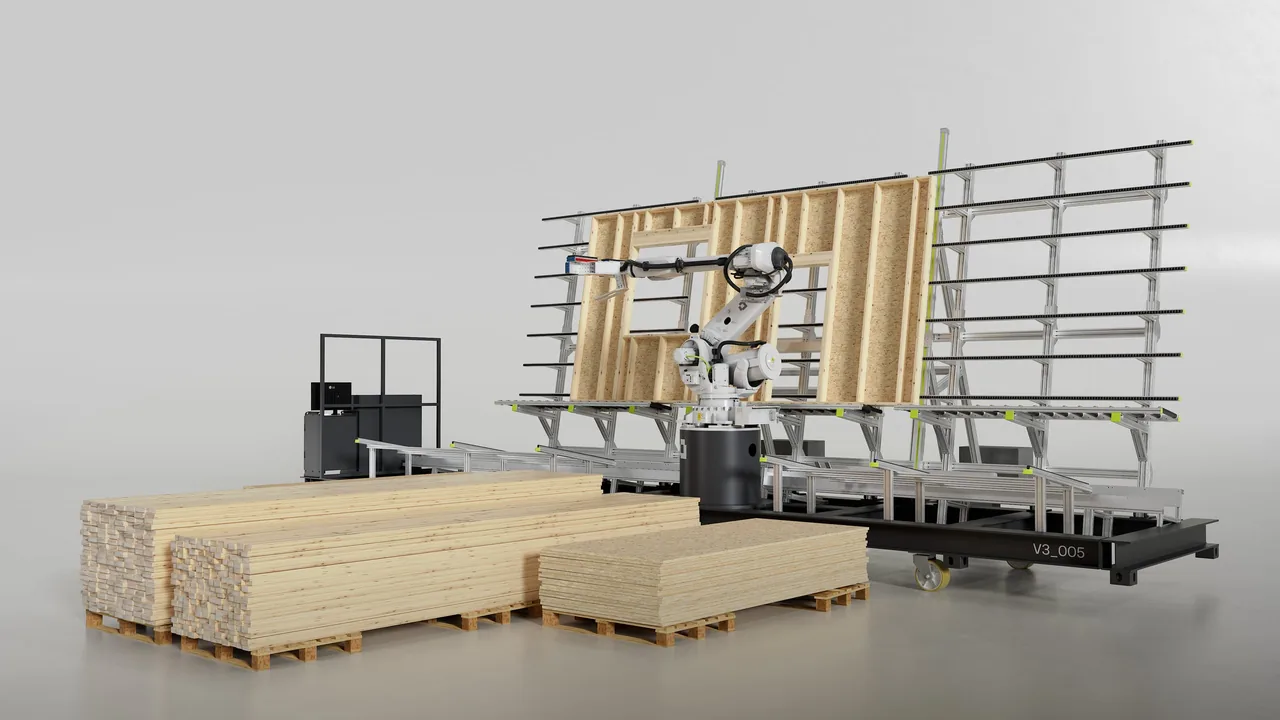
What this shows is a plan that absorbed a change of scope inside one project, as AUAR’s site took shape. It is one completed launch, not a standard turnaround. It records no weeks saved, and it does not tell you how long your own brief will take. The MicroFactory case study sets out the production story, including the grey passes and the final frames.
Prepare the next brief
Before asking for a delivery date, fill in what you know. Leave a field blank until someone confirms it. The table is a planning aid: completing it does not reserve production time.
| Input | Who confirms it | What is ready | What remains open |
|---|---|---|---|
| Current product files and their revision | |||
| Known dimensions and units | |||
| Material and finish references | |||
| The first output and the channels where it will appear | |||
| The launch date and any fixed review dates | |||
| The people who approve the product and the creative work, with one agreed feedback set |
Use the CGI brief template to record what is ready and what is still open. Then tell us about your brief so we can review the scope and plan the next step.
Start the conversation
Have a product worth showing?
We reply to every brief personally, usually within one working day.
FAQ
Common questions, answered.
What are lead times in digital marketing and tech industries?
Lead time is the time from the agreed start of a project to its final handoff. Include file checks, creative work, client reviews and delivery in the plan.
How does 3D visualisation reduce lead times?
A team can review the product, agree views and plan assets from the same 3D build. The time saved depends on the source files, scope and review process.
What are the main benefits of reduced lead times?
A shorter review process can leave more time for the next task. It does not remove the need to check product detail, image quality and final files.
What must be ready before a schedule can be agreed?
The current product files and their revision, known dimensions and units, material and finish references, the first output and where it will appear, the launch date and any fixed review dates, and the people who will approve the product and the creative work. Anything still open should be recorded as open, so the plan shows what it depends on.
Is a quick preview the same as an approved asset?
No. A working preview helps the team make a decision, such as a view or a shot order. An approved asset has also passed the checks agreed for final delivery, such as product detail, materials and file requirements.
What challenges exist when implementing 3D visualisation?
Missing files, late changes and slow reviews can hold up a project. Set clear roles, check the source data and agree when each stage needs approval.


Start the conversation
Got a product worth showing? Let’s talk about what it needs to do.
We reply to every brief personally, usually within one working day.