
Why Rendering Matters in Product Design and Development

TL;DR
Product rendering makes a design easier to discuss by showing form, materials and context. Use it to answer a specific visual question, record the source revision and separate visual approval from engineering validation.
Product rendering turns a digital model into an image that can be discussed outside the CAD environment. It can show how a proposed product looks, how its parts relate and how it will be presented at launch. Its value comes from the decision it helps someone make.
A realistic image does not prove that a mechanism works, a material is suitable or a product is ready for manufacture. Keep those questions with the engineering team. Treat rendering as a communication stage connected to the underlying product evidence.
Start with the review question
Before selecting a camera or finish, name the question the image must answer. A design review, a technical explanation and a campaign launch need different images.
| Purpose | Useful visual | Review boundary |
|---|---|---|
| Compare visible design options | Consistent views of each option | Keep camera and lighting comparable; identify the changed feature |
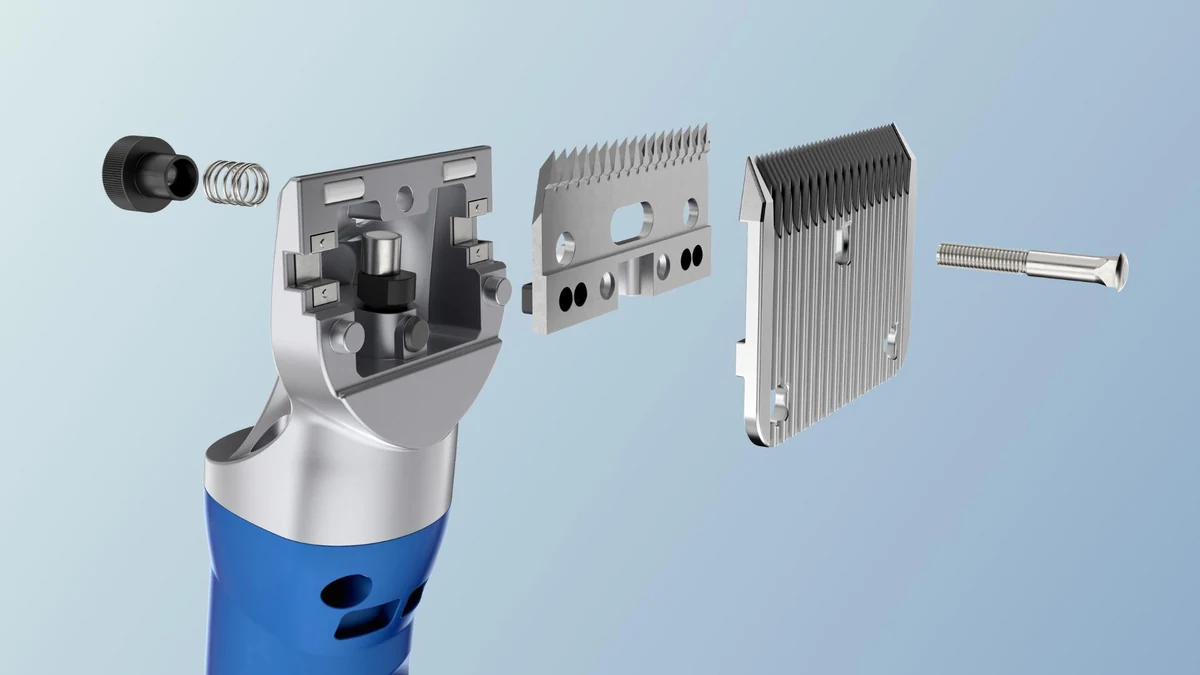
| Explain an assembly | Exploded view or labelled cutaway | Check component relationships with the product team |
| Explain a sequence | Technical animation | Confirm the movement and sequence; do not invent physical behaviour |
| Present a proposed product before manufacture | Product stills from resolved CAD | Mark provisional geometry and finishes for later confirmation |
| Introduce the product to buyers | Directed hero stills and film | Agree the product story, references and campaign outputs |
For example, a reflected highlight can help reveal the curvature of a housing, but it cannot establish the housing’s strength. An exploded view can make the order of components clearer, but it should not imply an approved assembly procedure unless that procedure has been checked.
Keep the rendering connected to the product revision
Provide the current CAD export or dimensioned drawings and identify the revision. Agree which surfaces, parts and markings need to appear. Missing internal geometry should be recorded as a gap, not filled with plausible-looking detail and presented as fact.
Materials need references too. A finish name alone may leave colour, roughness, coating and transparency unresolved. Use the supplied finish specification, photographs and a physical sample where available. List the assumptions that need confirmation when no sample exists. The Product truth standard explains how reference and review support the final image.
Review product detail and visual direction separately
First review the visible product: proportions, components, labels and finishes. Then judge the image: composition, lighting, emphasis and its suitability for the audience. Both reviews matter, but approval of one does not automatically approve the other.
Record who can approve each stage. If the CAD changes after approval, identify the affected images and sequences before continuing. This is especially useful when stills and film share a Master Asset: reuse is valuable only while the underlying product information remains current.
Plan the move from development to launch
An internal review image may need further work for a public campaign. Close-up cameras can reveal missing detail; new crops can change the composition; a film may need separated parts and a reviewed sequence. Decide the deliverable suite before assuming an existing model is ready for every output.
Our Petalite project shows product CGI in an EV charging context. For the production stages behind a finished still, see the product-rendering guide. For a mechanism or industrial system that needs explaining, explore Technical CGI and the pre-manufacture visualisation workflow.
What to put in the brief
Include the product stage, source revision, intended audience, the question each image should answer, required outputs and review owner. Add the launch date and any unresolved product details. Tell us about your brief when you need to turn those inputs into a directed product story.
Start the conversation
Have a product worth showing?
We reply to every brief personally, usually within one working day.
FAQ
Common questions, answered.
What does rendering add to a product design review?
Rendering shows the visible form, materials and context of a design in a way that a wider audience can discuss. The review should identify the decision being made and the source revision used.
Does a realistic render prove that a product will work?
No. A render communicates appearance. Engineering calculations, simulation, testing and product-team approval remain separate activities, and any result shown visually needs its own evidence.
Can product rendering start before manufacturing?
Yes, where the geometry and references are sufficiently resolved. Record provisional details and agree how final images will be checked when the product or sample changes.


Start the conversation
Got a product worth showing? Let’s talk about what it needs to do.
We reply to every brief personally, usually within one working day.